
Official Tickets (General Sales)
Purchase Information
Through online booking, you can select your seat and purchase tickets from both within Japan and overseas.
Tickets can also be purchased after the performance has started, so they may be used as same-day tickets as well.
'%3e%3cpath%20d='M20.0184%207.98437C19.5635%207.52927%2019.2971%206.9192%2019.2725%206.27617C19.248%205.63314%2019.4671%205.00454%2019.8861%204.51609C19.9207%204.47547%2019.9387%204.42325%2019.9365%204.3699C19.9343%204.31656%2019.912%204.26603%2019.874%204.22844L17.4607%201.81234C17.4208%201.77247%2017.3667%201.75007%2017.3103%201.75007C17.2539%201.75007%2017.1998%201.77247%2017.1599%201.81234L13.3132%205.65906C13.1712%205.80093%2013.0643%205.97395%2013.0009%206.16437C12.9377%206.35522%2012.8309%206.52872%2012.689%206.67111C12.5471%206.8135%2012.374%206.92087%2012.1833%206.98469C11.9928%207.04818%2011.8196%207.15508%2011.6775%207.29695L1.8124%2017.1598C1.77252%2017.1997%201.75012%2017.2538%201.75012%2017.3102C1.75012%2017.3666%201.77252%2017.4207%201.8124%2017.4606L4.22575%2019.874C4.26334%2019.9119%204.31387%2019.9342%204.36722%2019.9364C4.42057%2019.9387%204.47279%2019.9207%204.51341%2019.886C5.00175%2019.4666%205.63049%2019.2471%206.27374%2019.2715C6.917%2019.2959%207.52731%2019.5624%207.98248%2020.0176C8.43766%2020.4727%208.70412%2021.0831%208.72851%2021.7263C8.7529%2022.3696%208.53343%2022.9983%208.11404%2023.4866C8.07939%2023.5273%208.06137%2023.5795%208.0636%2023.6328C8.06583%2023.6862%208.08815%2023.7367%208.12607%2023.7743L10.5394%2026.1877C10.5793%2026.2275%2010.6334%2026.2499%2010.6898%2026.2499C10.7462%2026.2499%2010.8003%2026.2275%2010.8402%2026.1877L20.7058%2016.3226C20.8477%2016.1804%2020.9546%2016.0073%2021.0181%2015.8167C21.0813%2015.6259%2021.1881%2015.4524%2021.33%2015.31C21.4719%2015.1676%2021.645%2015.0602%2021.8357%2014.9964C22.0261%2014.933%2022.1991%2014.8261%2022.341%2014.6841L26.1877%2010.8374C26.2276%2010.7975%2026.25%2010.7434%2026.25%2010.687C26.25%2010.6306%2026.2276%2010.5765%2026.1877%2010.5366L23.7743%208.12328C23.7368%208.08536%2023.6862%208.06305%2023.6329%208.06082C23.5795%208.05858%2023.5273%208.0766%2023.4867%208.11125C22.9989%208.53091%2022.3707%208.75098%2021.7277%208.72745C21.0847%208.70393%2020.4742%208.43855%2020.0184%207.98437Z'%20stroke='%23990002'%20stroke-width='2'%20stroke-miterlimit='10'/%3e%3cpath%20d='M13.6993%207.68031L12.7964%206.77742M16.1066%2010.0877L15.5045%209.48609M18.514%2012.4955L17.9124%2011.8934M21.2226%2015.2037L20.3197%2014.3008'%20stroke='%23990002'%20stroke-width='2'%20stroke-miterlimit='10'%20stroke-linecap='round'/%3e%3c/g%3e%3cdefs%3e%3cclipPath%20id='clip0_15_1283'%3e%3crect%20width='28'%20height='28'%20fill='white'/%3e%3c/clipPath%3e%3c/defs%3e%3c/svg%3e) Buy Tickets
Buy Tickets
'%3e%3cpath%20fill-rule='evenodd'%20clip-rule='evenodd'%20d='M7.59453%205.95285C7.85417%206.22828%208%206.60164%208%206.99092C8%207.3802%207.85417%207.75356%207.59453%208.02899L2.36676%2013.57C2.10667%2013.8454%201.75396%2014.0001%201.38622%2014C1.01849%2013.9999%200.665848%2013.845%200.40588%2013.5695C0.145913%2013.2939%20-8.66303e-05%2012.9202%203.85644e-08%2012.5306C8.67074e-05%2012.1409%200.146252%2011.7673%200.406342%2011.4919L4.65437%206.99092L0.406342%202.48999C0.153666%202.21306%200.0137546%201.84207%200.0167409%201.45691C0.0197273%201.07174%200.165373%200.703231%200.422308%200.430742C0.679244%200.158253%201.02691%200.00358899%201.39043%206.1677e-05C1.75395%20-0.00346563%202.10423%200.144426%202.36583%200.411883L7.59546%205.95187L7.59453%205.95285Z'%20fill='%23990002'/%3e%3c/g%3e%3cdefs%3e%3cclipPath%20id='clip0_15_118'%3e%3crect%20width='8'%20height='14'%20fill='white'/%3e%3c/clipPath%3e%3c/defs%3e%3c/svg%3e)
Select whether you are a registered member
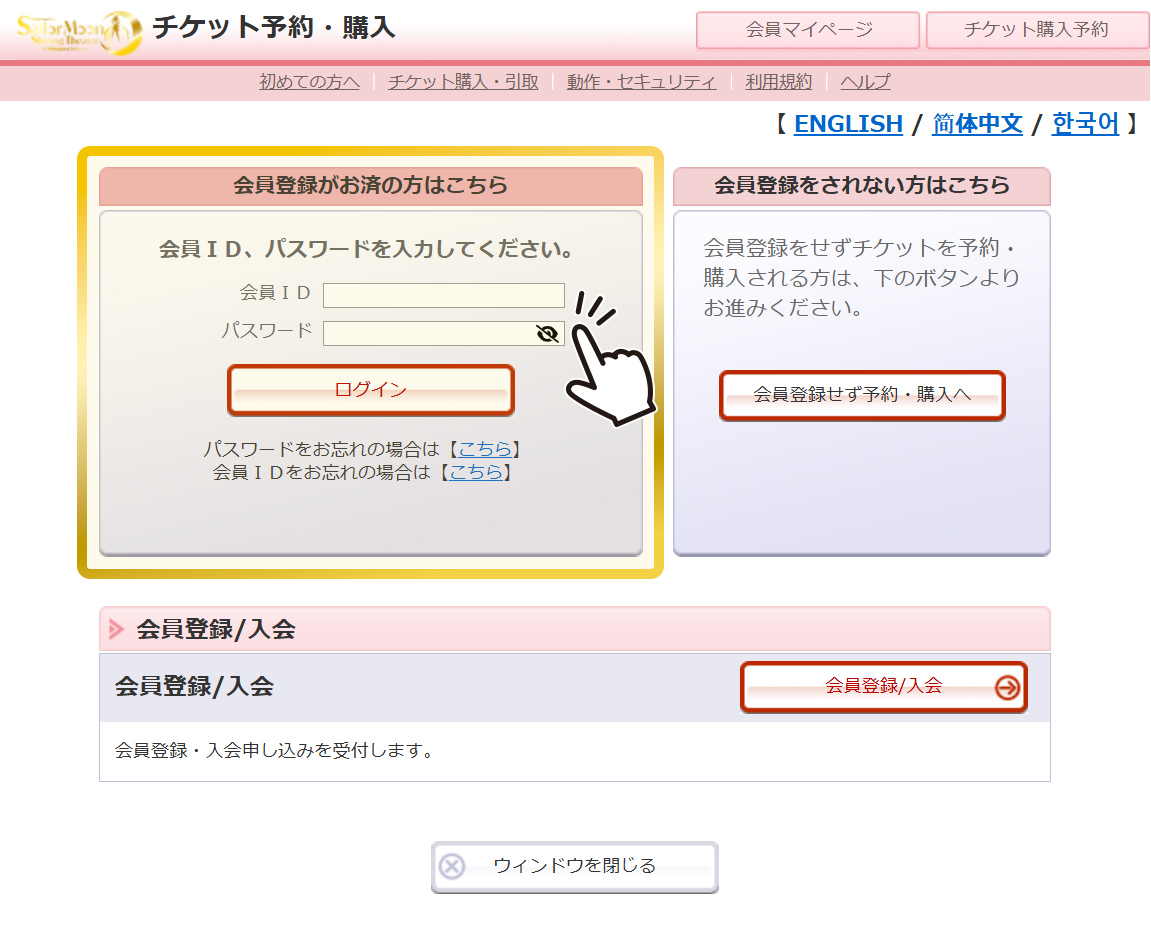
If you are already a registered member
Please enter your registered information in the “Member ID” and “Password” fields. After logging in, you will be redirected to the purchase page.
※Please note that registered member information will not be reflected in the following advance ticket sales:
- Pretty Guardians (Pretty Guardian Sailor Moon Official Fan Club) Advance Sale
- Nelkeha! Advance Sale
- 2.5 Friends Advance Sale
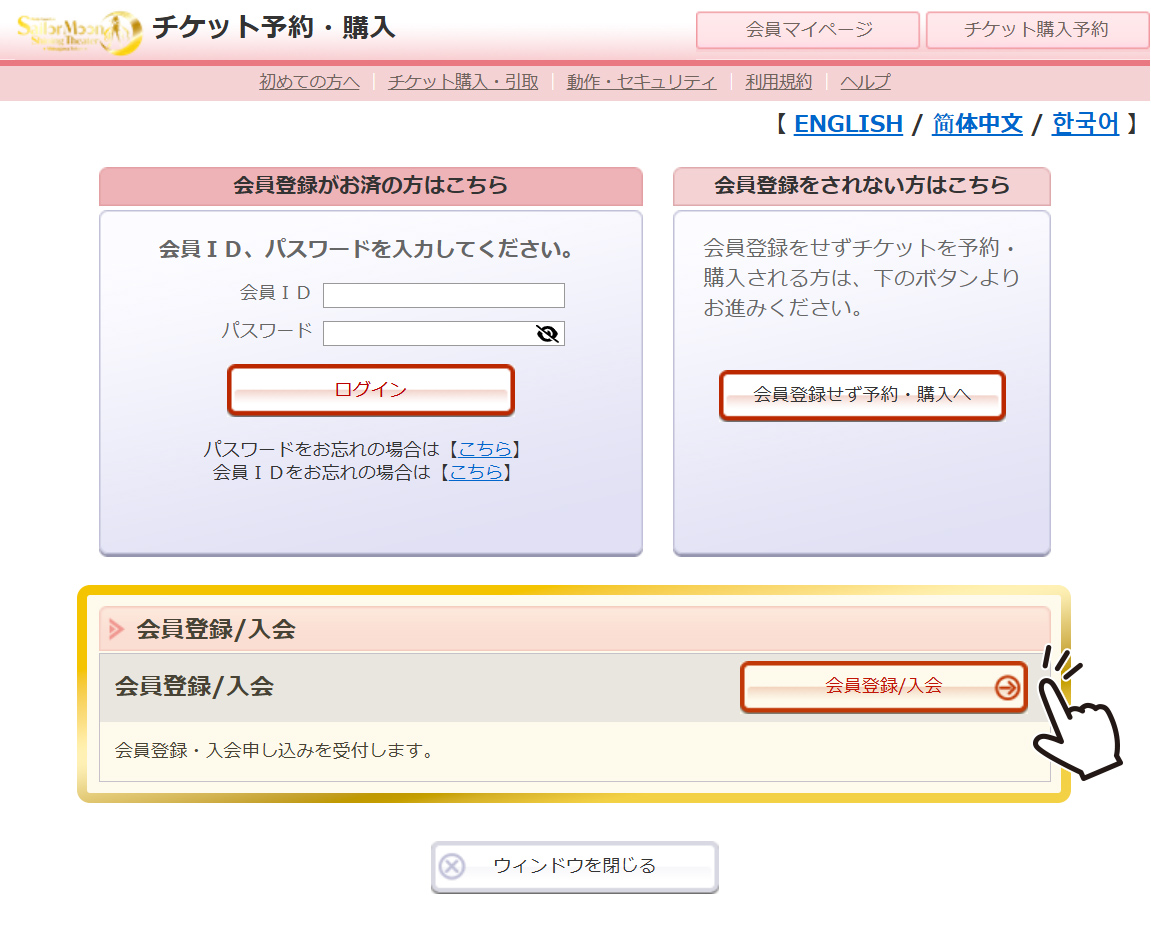
If you are registering as a new member
Please select “Register/Join” and follow the on-screen instructions.
Once registered, you will not need to re-enter your personal information for future ticket purchases.
※Note: Registration requires your name’s phonetic reading in Japanese Katakana and a Japanese phone number.
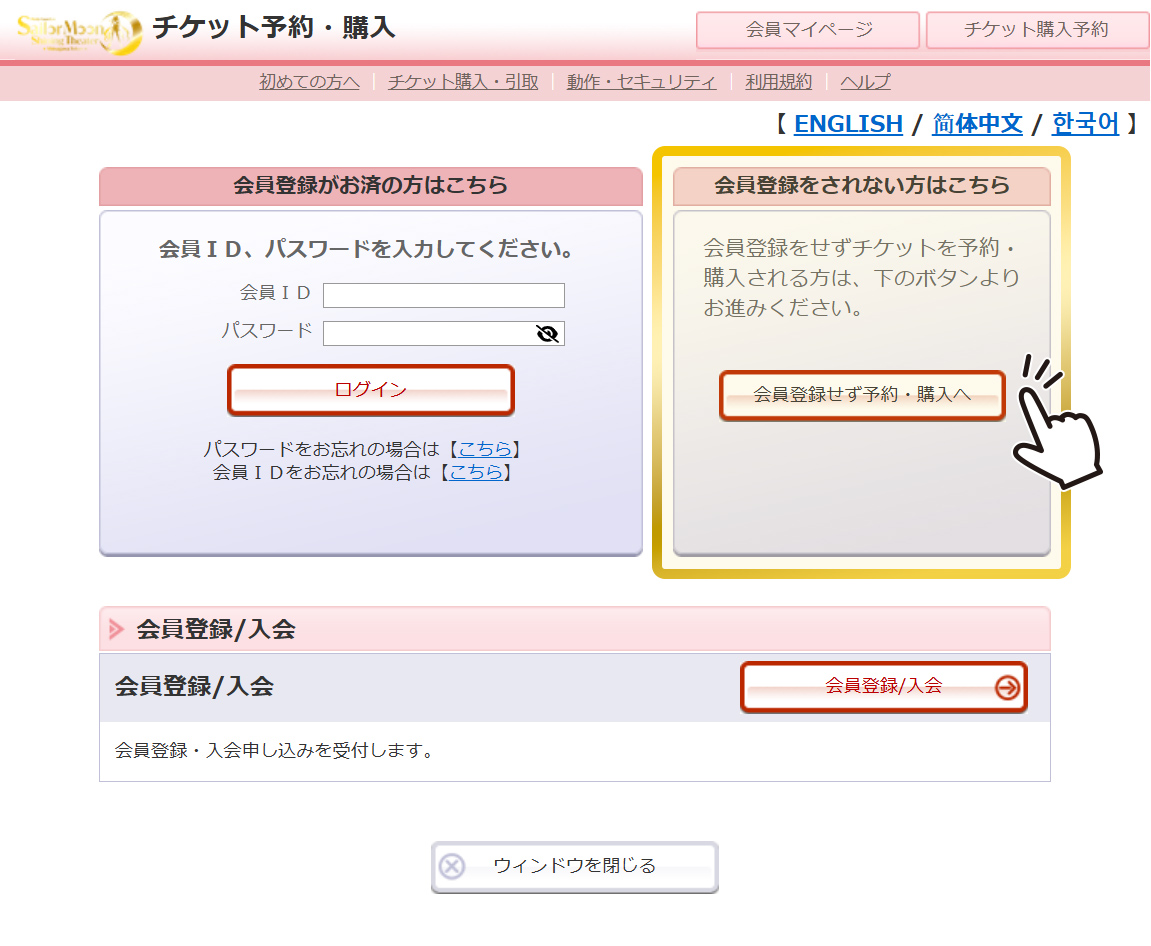
If you do not wish to register as a member
Please proceed to the purchase page by selecting “Continue without registration.”
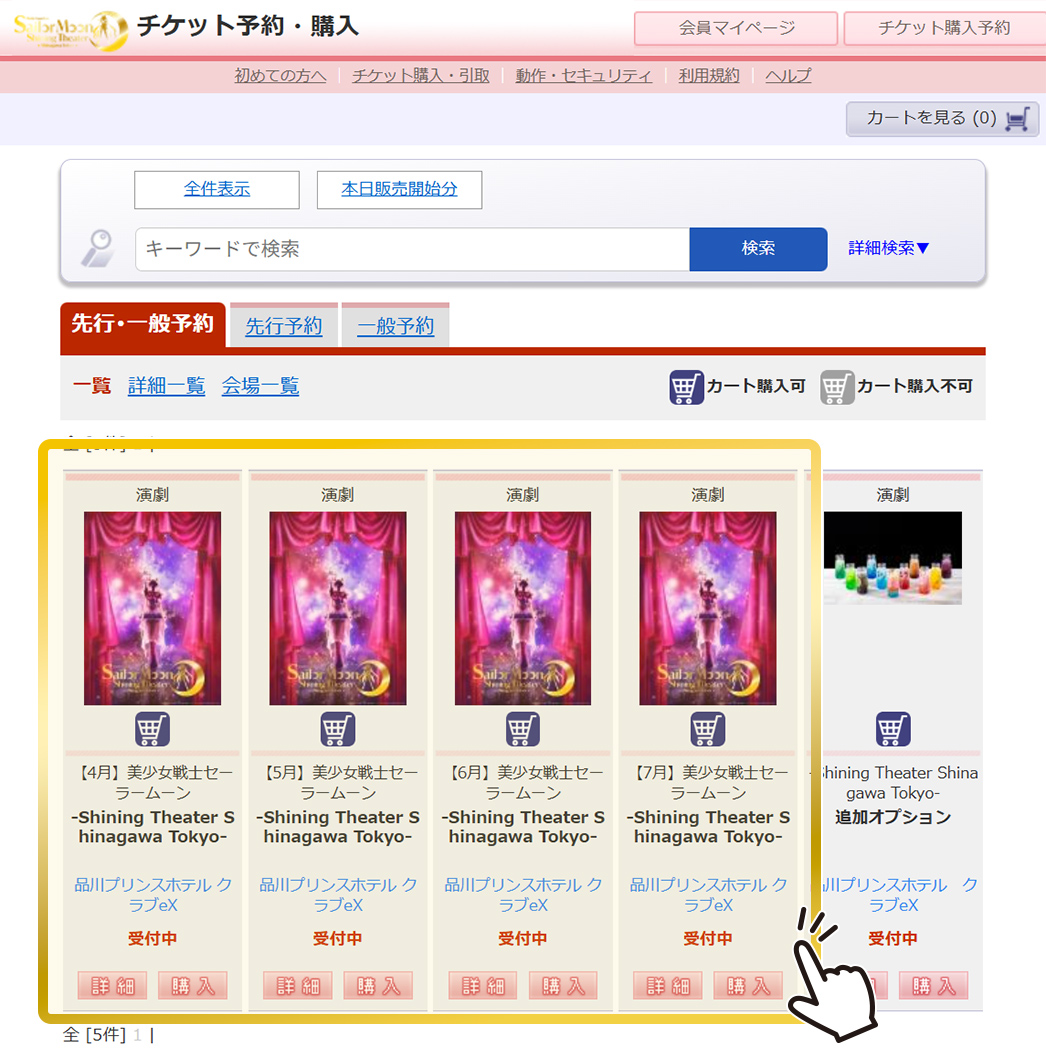
Select the month you wish to attend the performance
The purchase pages are divided by performance month. First, click the “Purchase” button for the month you want to attend.
On the next screen, you can select the performance date and start time.
*If you wish to purchase additional options, please refer to the “How to Purchase Additional Options”.
Check Seat Availability
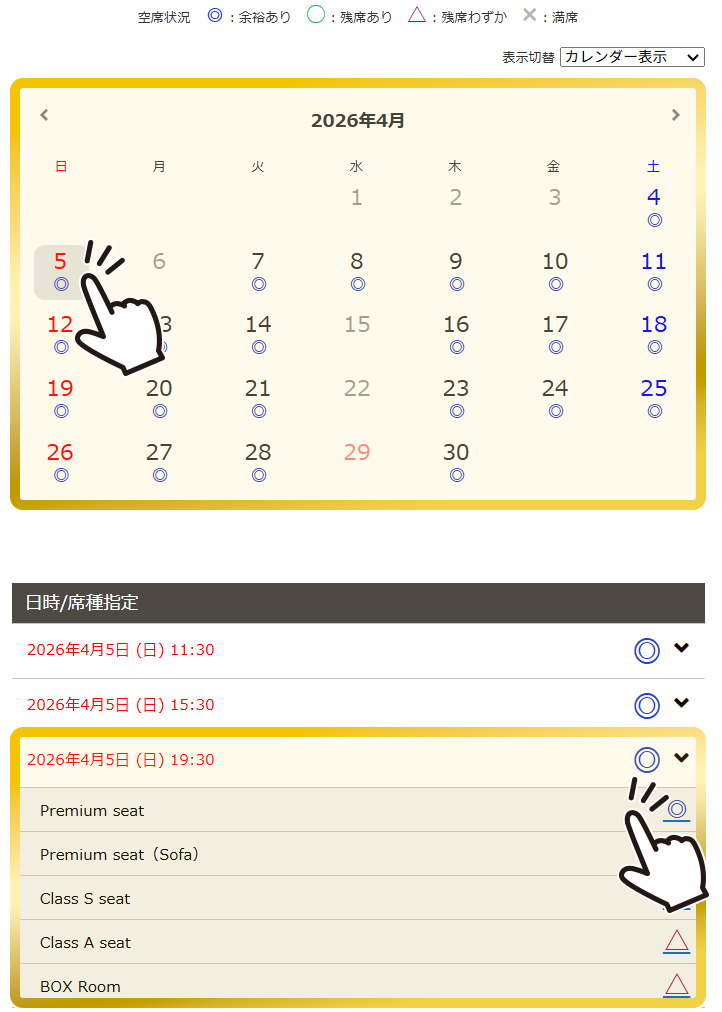
Select your desired date, time, and seat type from the performance calendar.
You can check seat availability for each date and seat type on the performance calendar.
Select the number of tickets and the Crystal Bottle Drink (seat benefit)
On this page, please select the number of tickets you wish to purchase.
You may purchase up to 4 tickets per transaction for the same performance date and time (excluding BOX Room).
For customers purchasing [Premium seat / Premium seat (sofa) / Class S seat]
On this page, please select the Crystal Bottle Drink + Drink Goods set included as a seat benefit.
From the flavors and character names listed in the seat/ticket type list, choose your desired ticket type (drink flavor) and the quantity.
*Please note that the type of the seat benefit Crystal Bottle Drink + Drink Goods set can be selected until 23:59 on the day before each performance. Tickets for the performance can still be purchased after this time; however, the drink set type will be assigned randomly.
![For customers purchasing [Premium seat / Premium seat (sofa) / Class S seat]](/wp-content/uploads/2026/03/manual_ticket_jp_4-1.jpg)
For customers purchasing [Class A seat]
For Class A Seats, tickets for children aged 4–12 (Class A Seat (4–12 years old)) will be available on the day of the performance.
Guests aged 13 and above are requested to purchase the regular Class A seat ticket.
*If a guest who is aged 13 or older on the day of the performance enters using a Class A seat (Ages 4–12) ticket, they will be required to pay the price difference from the regular ticket on the day of the performance. Please make sure to select the correct ticket type when purchasing.
![For customers purchasing [Class A seat]](/wp-content/uploads/2026/03/manual_ticket_jp_4-2.jpg)
Select Your Seat
At the bottom of the same page as STEP 4, under “Seat reservation method,” you can secure your seat according to your preference.
If you do not wish to select a seat
Please choose “Random seat Reservation.” This option is recommended if you would like to secure a seat quickly. A seat as close to the stage as possible will be automatically assigned from the available seats.
You can check the assigned seat on the next page.
If you would like to select your seat
Please choose “Reserve by seat.”
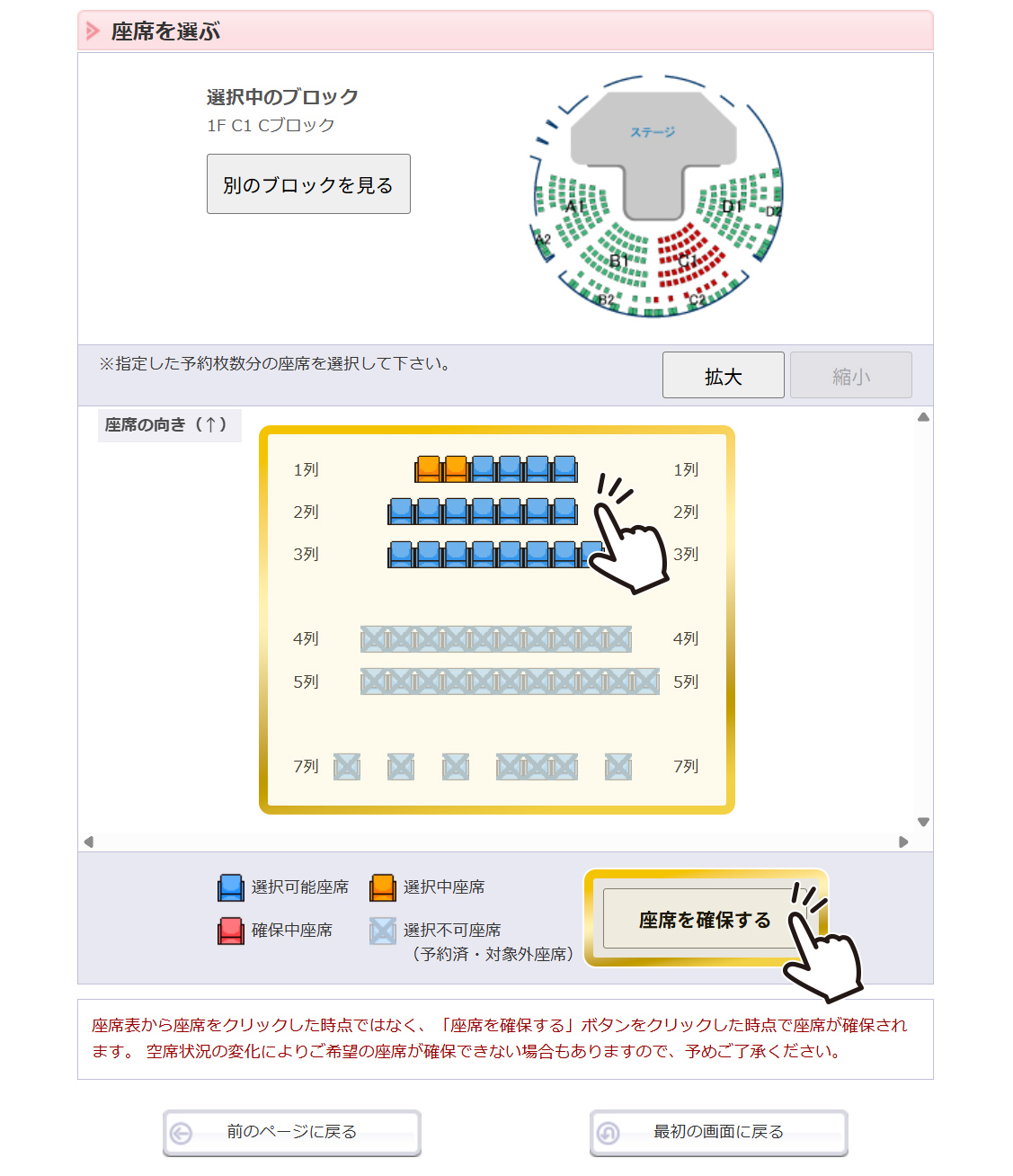
After proceeding to the next page, select your preferred block from the seating chart. Then choose your desired seat from the available seats (shown in dark blue).
After selecting your seat(s), please confirm that the number of seats selected is displayed in orange, and then press “Save Seat.” You will be able to check the seat numbers of your secured seats on the next page.
For BOX Room, if you select “Reserve by seat-block,” you will be able to choose your preferred room.
* Please note that seats are not secured when selected on the seating chart. Seats will only be secured after pressing “Save Seat.” Due to changes in seat availability, your preferred seat may not be secured. Thank you for your understanding.
For customers purchasing BOX Room (regarding seat number display)
On the seat confirmation page, the system will display the seat number as “1” as shown below:
Example: BOX Room, no drink, 2F, BOX Room 6, Seat 1
In reality, as stated on the official website, each room is sold as a unit and can accommodate up to 4 guests, so please rest assured.
When purchasing tickets for multiple performances at once
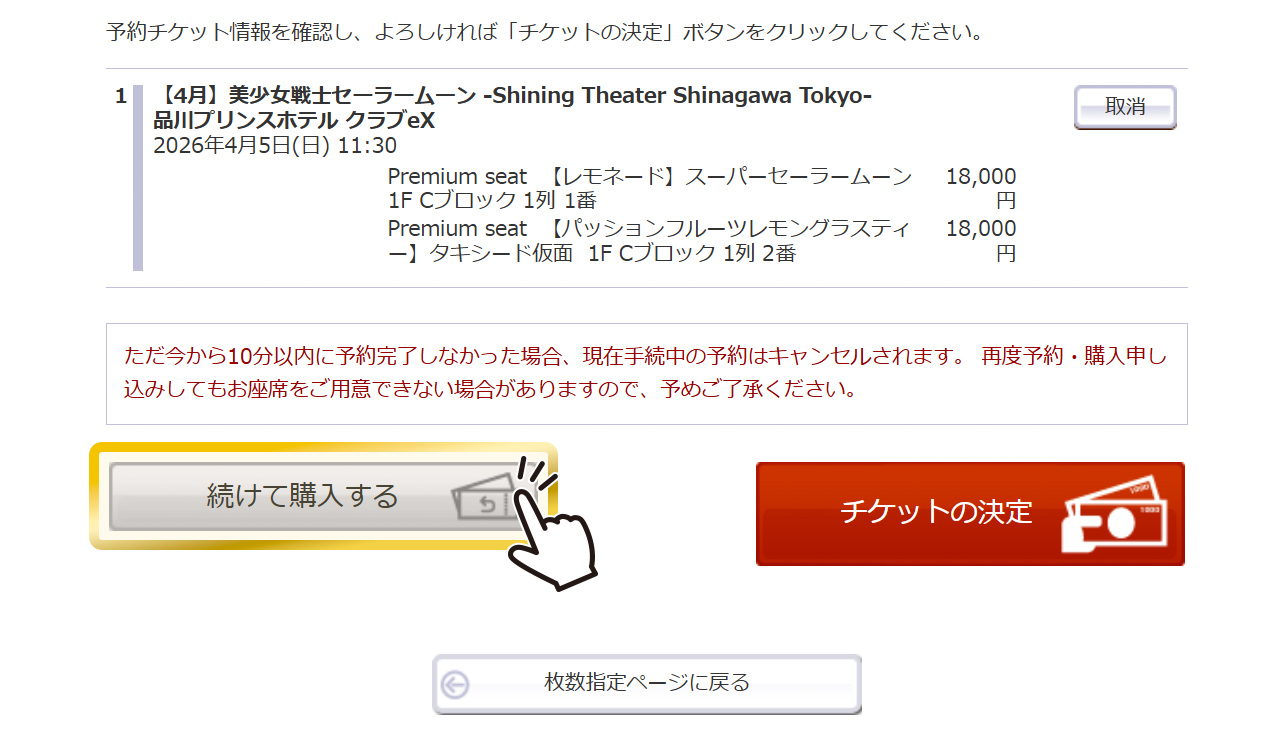
On the seat confirmation page, please select “Continue shopping.” You will return to the performance list page, where you can add another performance ticket by following the same steps starting from STEP 2.
* Please note that you can purchase up to 9 items per transaction.
* If you secure tickets for another performance via “Continue shopping,” all seats in your cart will be reserved again for 10 minutes.
When purchasing additional options together
On the seat confirmation page, please select “Continue shopping.” You can purchase additional options together with your performance tickets from the “Additional Options” purchase page listed on the performance list page.
For detailed instructions on how to purchase additional options, please refer to “How to Purchase Additional Options”.
* Additional options can be purchased until 23:59 two days before each performance.
Select your payment method and review your reservation details
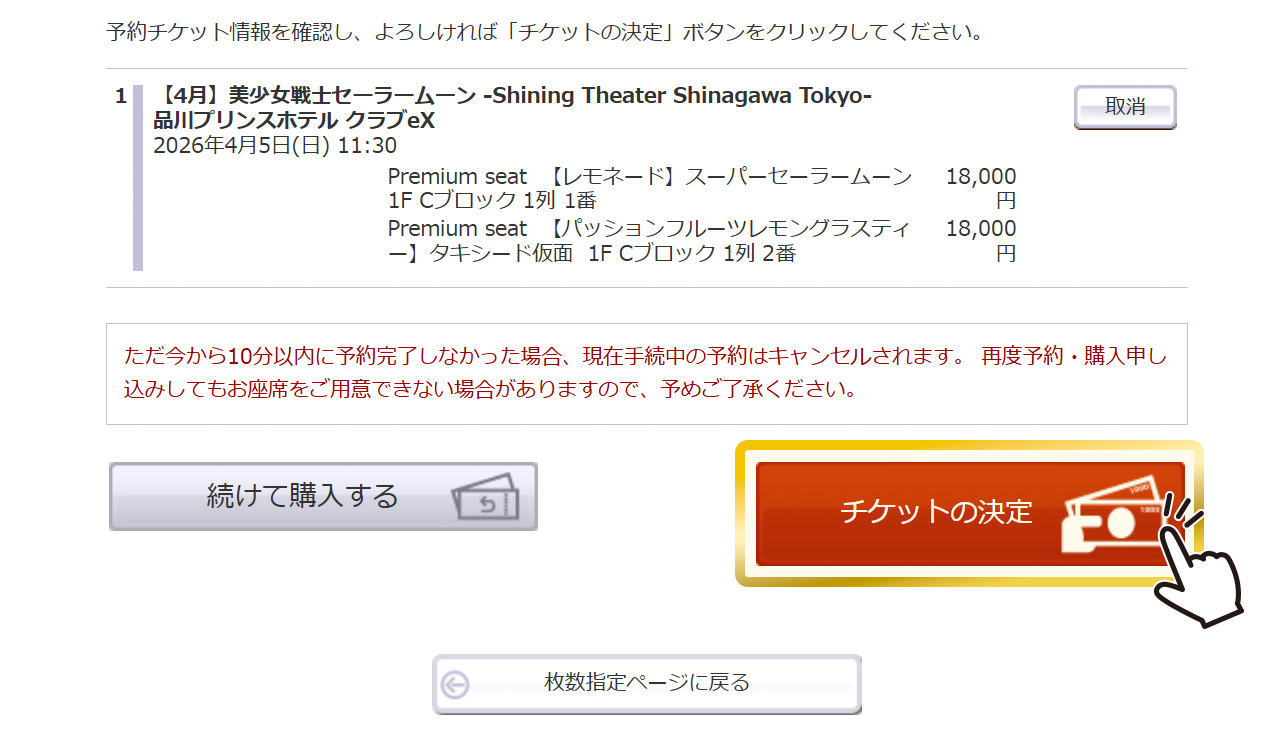
On the seat selection confirmation page, please verify that the information in your cart is correct, then click “Confirm Tickets.”
On the following pages for selecting your payment and ticket delivery methods, please follow the on-screen instructions to enter your customer information.
Please also note that, in order to complete your purchase, you must read and agree to the Terms of Use. Check each “I Agree” box accordingly. (If you do not agree, you will not be able to proceed with your purchase.)
Once you receive the reservation confirmation email, your booking is complete!
Once you confirm that your receipt details—such as the “Confirmation Number” and “Date of Reservation”—are displayed on the screen, your reservation/purchase is complete.
A confirmation email with your reservation and purchase details will be sent to your registered email address. Please check your confirmation number and reservation status, and follow the instructions provided.
You can also view your reservation and purchase details from your My Page.
To log in to My Page, you will need the “Confirmation Number,” “Phone Number,” and “Name (in Katakana)” issued at the time of ticket purchase. (If you are a registered member, please enter your “Member ID” and “Password.”)
Go to My PageTicket Pickup Information
Tickets for this performance will be issued as QR code e-tickets via “ResQ,” which you will use for entry.
Before arriving at the venue, please obtain your entry QR code via the URL provided in your reservation confirmation email or from your My Page. (One QR code will be issued per seat.)
On the day of the performance, simply scan your QR code at the scanner located at the theater entrance to gain admission.